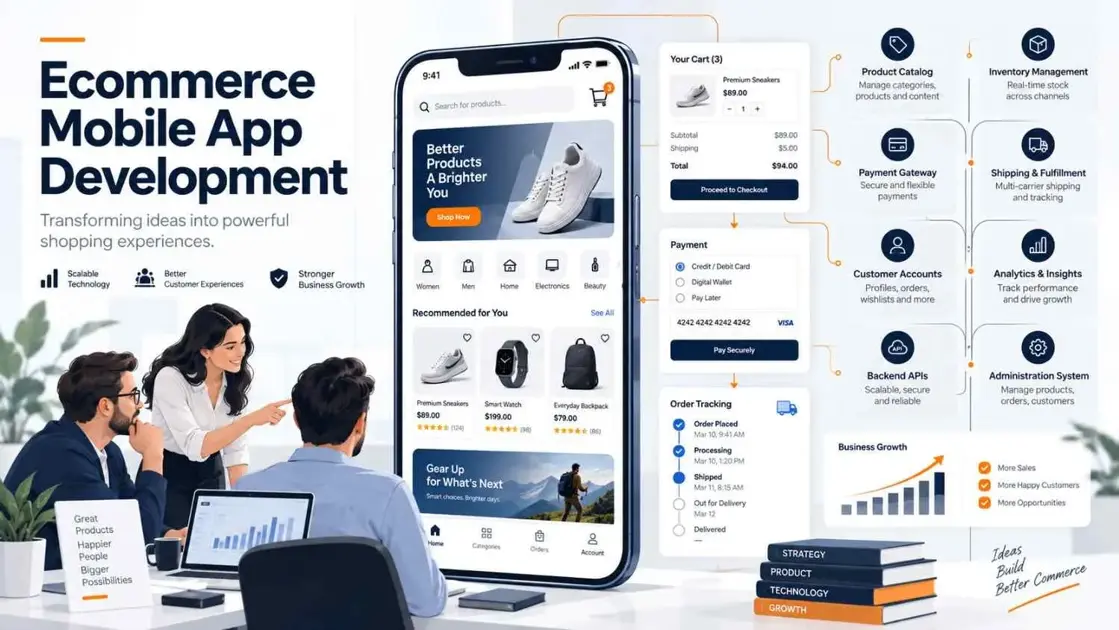
Your customers are already shopping on their phones. The real question is whether your ecommerce business is giving them the fast, convenient experience they expect. A responsive website is a great starting point. But as an ecommerce business grows, customers may expect faster product discovery, seamless checkout, saved favorites, order tracking, personalized recommendations, and easier account management. That is where ecommerce mobile app development becomes valuable. An ecommerce app can turn the shopping journey into a faster and more personalized mobile experience. But building a successful ecommerce application requires much more than putting your existing website inside an app. You need the right:
- Customer journey
- Features
- UI/UX
- Mobile technology
- Backend
- APIs
- Payments
- Security
- Testing
- Cloud infrastructure
- Maintenance strategy
This guide explains the complete ecommerce mobile app development process, including features, technologies, cost, Shopify and WooCommerce integrations, and how to select the right development company.
For end-to-end implementation, see IntuivoTech Mobile App Development Services.
What Is Ecommerce Mobile App Development?
Ecommerce mobile app development is the process of planning, designing, building, testing, launching, and maintaining a mobile application that lets customers browse and purchase products or services on smartphones and tablets. A modern ecommerce app may connect with:
- Product catalogs
- Inventory systems
- Payment gateways
- Customer accounts
- Order management systems
- Shipping providers
- Analytics tools
- CRM platforms
- Marketing platforms
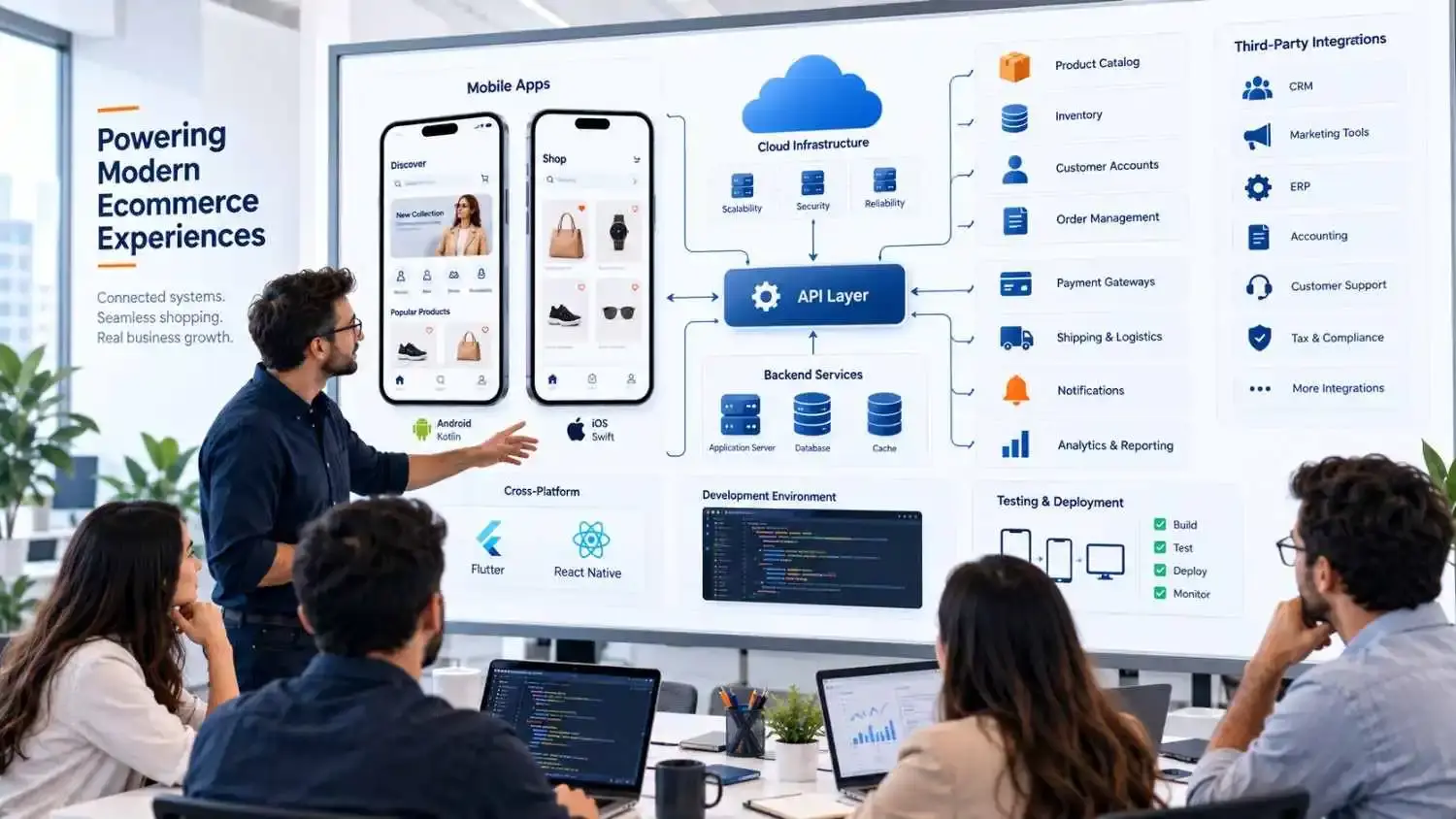
The mobile application itself is only the customer-facing layer. Behind the screens customers see, the system may require:
- APIs
- Databases
- Authentication
- Payment processing
- Cloud infrastructure
- Search
- Security controls
- Notifications
- Analytics
- Existing ecommerce platforms
For businesses with complex workflows, the application may also need to communicate with custom ERP, CRM, warehouse, inventory, accounting, or internal software systems. This is why ecommerce mobile app development should begin with the customer journey and business architecture rather than immediately choosing a programming framework.
For a broader foundation, read the Complete Mobile App Development Guide. For commerce platforms that need custom ERP, CRM, inventory, or backend workflows, see IntuivoTech Bespoke Software Development Services.
Why Invest in an Ecommerce Mobile App?
Not every ecommerce business needs an application. If customers purchase only once or twice and your mobile website already gives them an excellent experience, building an app may not be your priority. A mobile application becomes more valuable when customers have a reason to return regularly. An ecommerce app can provide:
- Faster access for repeat customers
- Saved carts
- Wishlists
- Personalized experiences
- Convenient order tracking
- Push notifications
- Loyalty programs
- Faster account access
- Mobile-specific experiences
- Easier repeat purchases
Before building an app, ask: What customer problem will this application solve better than our existing mobile website? That question can prevent a business from investing thousands of dollars into features customers do not actually need.
Key Ecommerce Mobile App Development Features
The right ecommerce mobile app features depend on your:
- Products
- Customer behavior
- Business model
- Catalog size
- Existing ecommerce system
- Purchase frequency
- Operational workflows
However, most online shopping applications need several core capabilities.
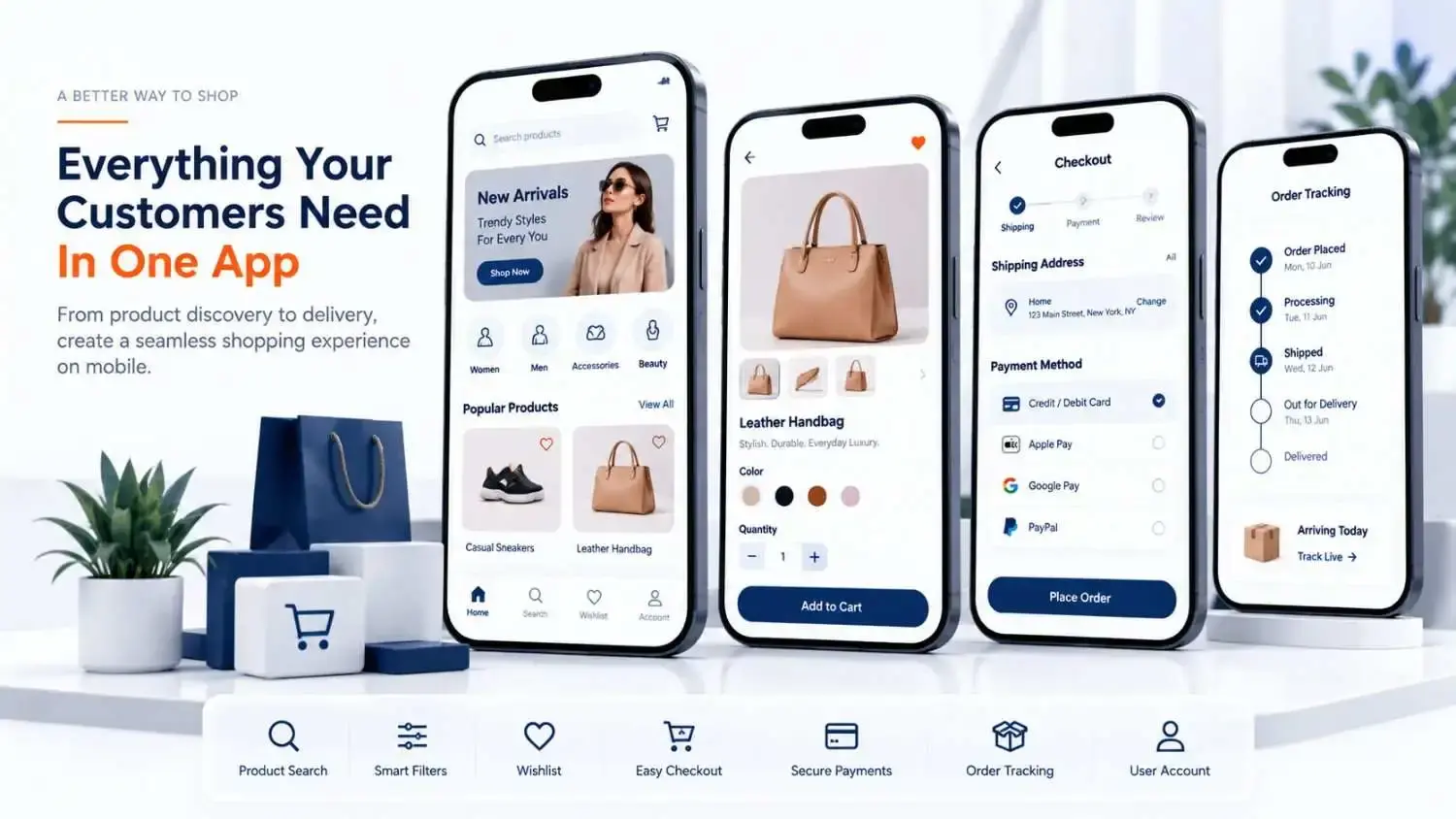
User Registration and Login
Customers should be able to create accounts without unnecessary friction. Common options include:
- Email and password
- Phone authentication
- Google sign-in
- Apple sign-in
- Guest checkout
Customer accounts may also contain:
- Saved addresses
- Payment preferences
- Order history
- Wishlists
- Returns
- Loyalty information
Do not force account creation earlier than necessary. For many stores, allowing customers to browse freely and offering guest checkout can reduce friction.
Product Search and Filters
Large product catalogs become frustrating when customers cannot quickly find what they need. Useful search functionality may include:
- Keyword search
- Search suggestions
- Category filters
- Price filters
- Brand filters
- Size filters
- Color filters
- Sorting
- Recently viewed products
For stores with thousands of SKUs, search architecture deserves special attention. A beautiful app with weak search can still create a poor shopping experience.
Product Categories and Product Pages
Product pages need enough information to help customers make buying decisions without overwhelming them. Important elements can include:
- Product images
- Pricing
- Variants
- Availability
- Product descriptions
- Specifications
- Shipping information
- Ratings
- Reviews
- Related products
- Add-to-cart actions
Images are especially important in ecommerce. However, large product images also need to be optimized so the app remains usable on slower connections.
Shopping Cart and Wishlist
Customers should be able to:
- Add products
- Remove products
- Change quantities
- Save items
- Return to carts later
For authenticated users, the backend can also synchronize carts and wishlists across multiple devices.
Secure Checkout and Payment Gateway
Checkout is one of the highest-impact areas of an ecommerce application. The objective is simple: Make buying easy without compromising security. Depending on the business and target market, payment methods can include:
- Credit cards
- Debit cards
- Apple Pay
- Google Pay
- PayPal
- Buy now, pay later
- Regional payment methods
Sensitive payment information should normally be handled through established payment providers rather than stored carelessly inside the application.
Order Tracking
The customer journey does not stop after payment. Users should be able to understand what is happening with their order. A simple order lifecycle might look like: Order Received → Processing → Shipped → Out for Delivery → Delivered. Shipping integrations can provide more detailed real-time tracking when required.
Push Notifications
Push notifications allow businesses to communicate directly with customers who opt in. They may be useful for:
- Shipping updates
- Order updates
- Restock alerts
- Wishlist updates
- Cart reminders
- Promotions
- Loyalty rewards
But notifications should provide value. Sending too many notifications can quickly encourage users to disable them—or uninstall the application.
Reviews and Ratings
Ratings and reviews help customers evaluate products. Useful functionality can include:
- Star ratings
- Written reviews
- Customer photos
- Verified purchase indicators
- Review filters
The administration system may also require moderation controls.
Personalized Recommendations
More advanced ecommerce apps may recommend products based on:
- Browsing history
- Purchase history
- Related products
- Customer preferences
- Shopping behavior
AI can support personalization, but it should be added because it improves shopping—not simply because AI is popular.
Customer Support
Customers should not have to leave the app every time something goes wrong. Support options can include:
- FAQs
- Live chat
- Chatbots
- Support tickets
- Phone support
- Returns
- Refund requests
Ecommerce Mobile App Development Process
Successful ecommerce mobile app development usually follows a structured process.
For a deeper stage-by-stage explanation, read the Mobile App Development Process Guide.
1. Business and Market Research
Before choosing technologies, understand the business. Research areas can include:
- Target customers
- Shopping behavior
- Competitors
- Existing website performance
- Product catalog complexity
- Order volumes
- Business systems
- Operational workflows
The goal is to determine what the mobile app genuinely needs to improve.
2. Requirements and MVP Planning
Next, divide features by priority. Instead of building everything immediately, define an MVP — Minimum Viable Product. A first version may include:
- Products
- Search
- Customer accounts
- Cart
- Checkout
- Payments
- Order tracking
A later version may introduce:
- Loyalty
- Advanced recommendations
- AI personalization
- Advanced search
- Social features
This approach reduces unnecessary complexity.
3. UI/UX Design
Designers map the shopping journey before serious development begins. The process may include:
- User flows
- Wireframes
- Visual design
- Interactive prototypes
- Usability reviews
Particular attention should be given to:
- Product discovery
- Search
- Product pages
- Cart management
- Checkout
- Account creation
- Order tracking
Changing a wireframe is relatively easy. Changing a completed checkout system is not.
4. Technology Selection
The team then determines how the application should be developed. Options may include:
- Native Android
- Native iOS
- Flutter
- React Native
The decision depends on:
- Performance
- Required device features
- Budget
- Timeline
- Existing team expertise
- Integrations
- Future roadmap
Technology should follow requirements rather than trends.
If you are comparing shared-code frameworks, read Flutter vs React Native in 2026.
5. App Development
Developers convert approved designs into functional application features. Modern teams often work in smaller development cycles or sprints. This means important functionality can be reviewed while development is still happening instead of waiting until the entire app is complete.
6. Backend and API Integration
The backend handles much of what customers never see. It may manage:
- Accounts
- Products
- Inventory
- Orders
- Pricing
- Promotions
- Authentication
- Notifications
- Analytics
- Business rules
APIs allow the application to communicate with these systems.
7. Payment Integration
Payment providers are integrated with checkout. Testing should cover more than successful payments. Teams should also test:
- Failed transactions
- Duplicate attempts
- Expired sessions
- Refunds
- Interrupted internet connections
- Payment confirmation delays
8. Testing
Testing should happen throughout development. A mature QA process can include:
- Functional testing
- UI testing
- API testing
- Payment testing
- Device compatibility
- Performance testing
- Security testing
- Network-condition testing
- Usability testing
Real-device testing is particularly valuable because customers use different:
- Phones
- Screen sizes
- Operating systems
- Memory levels
- Network connections
9. Launch and Deployment
After approval, the application is prepared for:
- Apple App Store
- Google Play
Teams may need:
- Screenshots
- App descriptions
- Privacy information
- Signing credentials
- Production configurations
- Store metadata
The backend and production infrastructure must also be ready.
10. Maintenance and Updates
Development continues after launch. Changes may be required because of:
- New Android versions
- New iOS versions
- Security updates
- Third-party API changes
- New devices
- Customer feedback
- New business requirements
- Performance issues
Maintenance should therefore be included in the original application strategy.

Technologies Used for Ecommerce Mobile App Development
There is no single best ecommerce mobile application technology stack. The right stack depends on the product.
Native Android Development
Native Android applications can be developed using technologies such as:
- Kotlin
- Android SDK
- Jetpack Compose
Native Android can make sense when:
- Android-specific functionality matters
- Deep device integration is required
- Platform-specific optimization is important
Native iOS Development
Native Apple applications commonly use:
- Swift
- SwiftUI
- Apple SDKs
Native iOS may be appropriate when the application depends heavily on Apple-specific functionality or highly platform-specific experiences.
Flutter
Flutter allows developers to create Android and iOS applications while sharing significant portions of one codebase. It can be useful when:
- Android and iOS are both important
- The interface requires strong visual consistency
- A shared development approach makes sense
- The team has Flutter and Dart expertise
React Native
React Native provides another approach to cross-platform mobile development. It can be attractive when:
- The business already uses React
- Developers know JavaScript or TypeScript
- Android and iOS need similar functionality
- Shared mobile development is desirable
Backend, APIs, Databases and Cloud
The mobile framework represents only part of an e-commerce technology stack. A complete product may use:
| Layer | Common Options |
|---|---|
| Backend | Node.js, Python, Java, .NET |
| APIs | REST, GraphQL |
| Databases | PostgreSQL, MySQL, MongoDB |
| Caching | Redis |
| Cloud | AWS, Google Cloud, Azure |
| Authentication | OAuth, token-based authentication |
| Notifications | Firebase Cloud Messaging, Apple Push Notification Service |
| Analytics | Product and mobile analytics platforms |
The exact architecture should depend on:
- Traffic
- Product catalog
- Integrations
- Security
- Data requirements
- Order volume
- Expected growth
For larger ecommerce projects, the architecture may also include custom APIs, admin systems, ERP integrations, CRM systems, and warehouse software.
How Much Does Ecommerce App Development Cost?
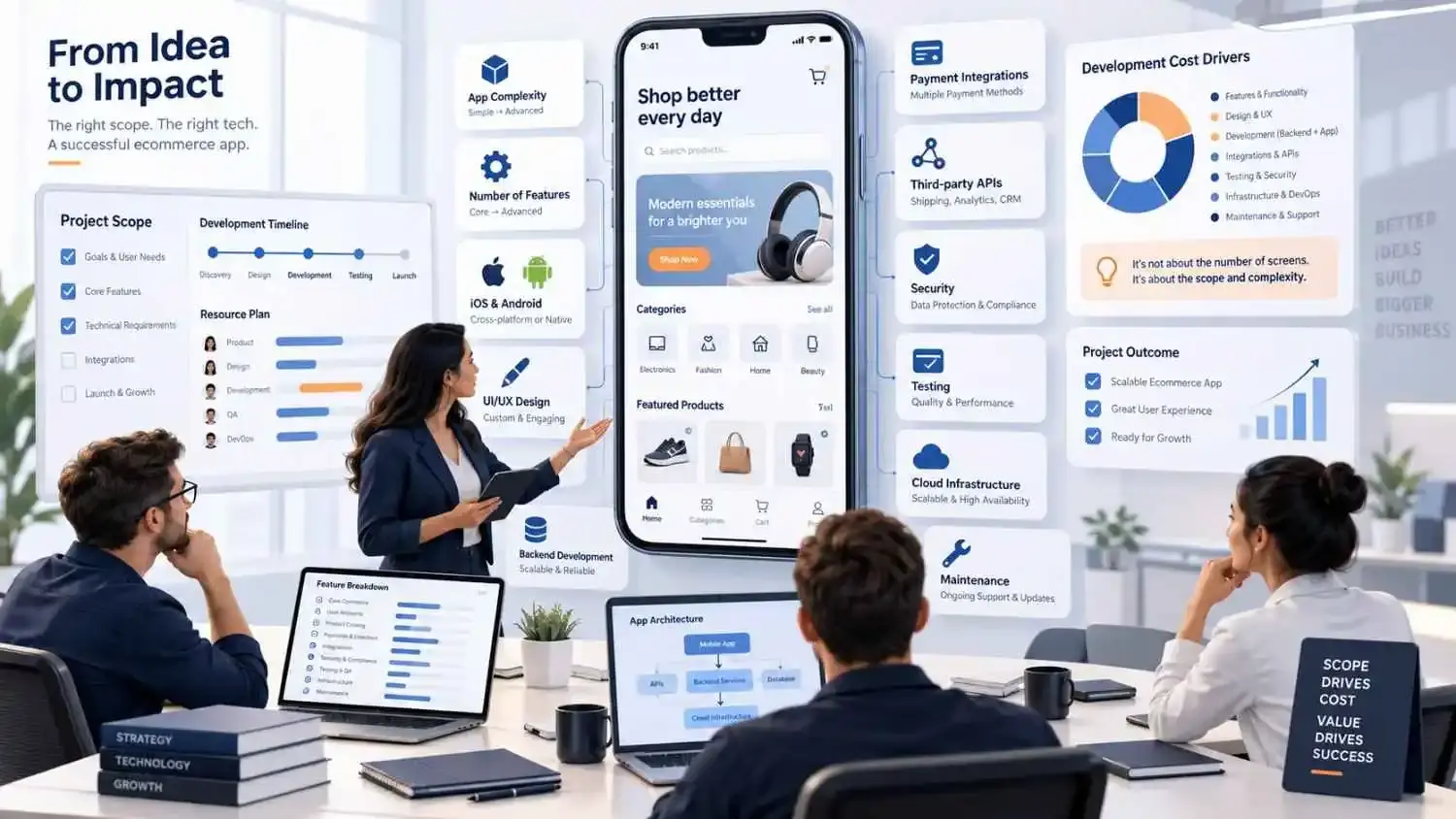
There is no universal ecommerce app development cost. A relatively simple mobile application connected to an existing ecommerce system is very different from a large marketplace with:
- Multiple sellers
- Custom logistics
- Loyalty systems
- Recommendations
- Complex inventory
- Multiple payment providers
- Enterprise integrations
Current market estimates can place smaller ecommerce MVP projects in the tens of thousands of dollars, while advanced applications with custom backends and complex functionality can require substantially larger budgets. The actual cost depends on scope.
App Complexity
More screens, workflows, user types, and business rules require more:
- Design
- Development
- Testing
- Maintenance
Features
A simple shopping cart costs less to develop than:
- Loyalty systems
- Subscriptions
- Marketplace functionality
- Real-time inventory
- Recommendation engines
- AI personalization
- Advanced search
UI/UX Complexity
A standard interface based on an established design system generally requires less work than a highly customized shopping experience with:
- Advanced interactions
- Animations
- Custom navigation
- Unique product experiences
Platform
Developing separate native Android and iOS applications usually creates more platform-specific work. Cross-platform development may reduce duplication when significant functionality can be shared. However, cross-platform development is not automatically cheaper for every product.
Backend Development
Using an existing Shopify or WooCommerce backend can simplify parts of some projects. A custom backend can significantly increase development scope when it needs to manage:
- Catalog
- Inventory
- Accounts
- Orders
- Administration
- Analytics
- Reporting
- Business rules
Payment Integrations
Complexity increases when the application requires:
- Multiple providers
- Multiple currencies
- Subscriptions
- Refunds
- Wallets
- Regional payment methods
Third-Party Integrations
Integrations may include:
- ERP
- CRM
- Shipping
- Warehouses
- Tax platforms
- Marketing systems
- Analytics
- Customer support
Each one requires implementation and testing.
Testing
An ecommerce app handles real customer transactions. Reducing testing simply to reduce development cost can create far more expensive problems later.
Maintenance
Long-term costs may include:
- Monitoring
- Bug fixes
- Security updates
- Operating-system updates
- Dependency updates
- Cloud infrastructure
- Future features
A reliable development estimate should therefore come after requirements and technical discovery—not from screen count alone.
Custom Ecommerce App vs Ready-Made Ecommerce App
Should you invest in custom ecommerce development or use an existing ready-made solution?
| Custom Ecommerce App | Ready-Made Solution |
|---|---|
| Built around specific requirements | Based on existing templates |
| Greater control over UX | Faster initial setup |
| Supports unique workflows | Lower initial investment |
| Flexible integrations | Limited by platform |
| Greater development responsibility | Vendor manages more infrastructure |
| Longer initial development | Faster launch |
Ready-made solutions can work well for straightforward stores. Custom development becomes more attractive when your business needs:
- Unique customer experiences
- Custom integrations
- Specialized workflows
- Complex business rules
- Greater flexibility
- Long-term product control
Ecommerce Mobile App Development for Shopify and WooCommerce
Businesses do not necessarily need to replace their existing ecommerce platform before building an app.
Creating a Shopify Mobile App
Businesses already using Shopify can use Shopify as the commerce backend while providing customers with a custom mobile interface. The app can connect with functionality such as:
- Products
- Collections
- Search
- Cart
- Customer accounts
- Checkout
This allows the business to retain Shopify operations while creating a more customized mobile experience.
WooCommerce App Development
A similar approach can be used with WooCommerce. A mobile application can connect with:
- Products
- Orders
- Customers
- Coupons
- Shipping
- Cart
- Checkout
WooCommerce remains the underlying commerce system while the application becomes the mobile customer experience.
When Should You Convert an Ecommerce Store Into an App?
Consider an application when:
- You receive meaningful repeat traffic
- Customers purchase frequently
- Mobile customers are important
- Push notifications provide genuine value
- Loyalty is strategically important
- Customers repeatedly track orders
- Your mobile website cannot deliver an important experience
Do not build an app simply because competitors have one. Build one because customers have a clear reason to install and continue using it.
How to Choose an Ecommerce Mobile App Development Company
The right ecommerce mobile app development company needs to understand both technology and commerce.
Use the broader How to Choose a Mobile App Development Company guide when shortlisting vendors.
Technical Expertise
Ask how the company approaches:
- Architecture
- APIs
- Databases
- Security
- Performance
- QA
- Cloud infrastructure
- Monitoring
Do not judge technical capability only from screenshots.
Ecommerce Experience
Developers working on ecommerce products should understand:
- Products
- Variants
- Carts
- Checkout
- Discounts
- Inventory
- Orders
- Payments
- Shipping
- Returns
- Customer accounts
Portfolio and Case Studies
Do not simply count applications. Ask: Which project in your portfolio is technically closest to ours? Then ask what made it difficult. The explanation often tells you more than the design screenshots.
Technology Expertise
A good team should explain why it recommends:
- Native Android
- Native iOS
- Flutter
- React Native
Be careful when one company recommends exactly the same framework for every project.
Security and Scalability
Discuss areas such as:
- Authentication
- Encryption
- Payment security
- API security
- Access controls
- Monitoring
- Backups
- Infrastructure
Scalability should be based on realistic growth expectations instead of vague promises about supporting millions of users.
Post-Launch Support
Ask what happens after release. Support may include:
- Monitoring
- Bug fixes
- Security updates
- OS compatibility
- New features
- API upgrades
- Infrastructure support
Common Ecommerce Mobile App Development Mistakes
Even technically functional applications can fail if the product strategy is weak. Common mistakes include:
- Building too many features in version one
- Copying the existing website screen by screen
- Forcing account creation too early
- Creating complicated checkout
- Ignoring poor networks
- Using oversized product images
- Sending too many notifications
- Ignoring accessibility
- Underestimating backend complexity
- Failing to test payment edge cases
- Choosing technology before defining requirements
- Ignoring analytics
- Treating maintenance as optional
A useful principle is: Build the smallest version that solves the customer's problem well, measure how customers use it, and improve from there.
FAQs About Ecommerce Mobile App Development
How much does ecommerce app development cost?
Cost depends on application complexity, platform selection, features, backend systems, integrations, UI/UX, payments, security, testing, infrastructure, and ongoing maintenance. A reliable estimate should be created after the application requirements are understood.
How long does ecommerce mobile app development take?
A focused first release can take several months, while applications involving complex custom backends, integrations, large catalogs, marketplaces, or multiple user types may take longer.
Can I convert my Shopify store into a mobile app?
Yes. A mobile application can use Shopify as its commerce backend while providing customers with a customized Android and iOS experience.
Is Flutter suitable for ecommerce app development?
Yes. Flutter can be suitable when Android and iOS are required and sharing a significant portion of the codebase makes sense. The decision should still depend on the product, integrations, performance expectations, and available development expertise.
Is React Native good for ecommerce applications?
React Native can also work well for ecommerce applications, particularly when the organization already has React, JavaScript, or TypeScript expertise.
Should I choose native or cross-platform development?
Choose based on requirements. Native development may be better when advanced platform-specific capabilities and deep device integration are important. Flutter or React Native may make more sense when Android and iOS need similar functionality and maintaining shared code provides practical advantages.
What features should an ecommerce mobile app include?
Most applications should consider:
- Product browsing
- Search
- Filters
- Product pages
- Shopping cart
- Secure checkout
- Customer accounts
- Payments
- Order history
- Order tracking
Features such as recommendations, loyalty, reviews, wishlists, and push notifications can be introduced according to customer needs.
How do I choose an ecommerce mobile app development company?
Evaluate:
- Ecommerce knowledge
- Mobile expertise
- Technical architecture
- Backend capability
- UI/UX
- Security
- QA
- Communication
- Relevant projects
- Post-launch support
Most importantly, choose a team that tries to understand your customers and business before recommending technology.
Building an Ecommerce App That Fits the Business
Good ecommerce mobile app development is not about packing as many features as possible into an application. It starts with understanding customers. What do they buy? How often do they return? Where does the existing mobile shopping experience create friction? Which capabilities would actually make shopping easier? Those answers should guide:
- Features
- UX
- Architecture
- Technology
- Development budget
- Product roadmap
Whether you need a new ecommerce application, a Shopify mobile experience, a WooCommerce application, or a completely custom commerce platform, spend enough time on discovery before development begins. IntuivoTech provides mobile app development and bespoke software development capabilities across product planning, UI/UX, native and cross-platform development, backend APIs, cloud architecture, testing, deployment, and ongoing support. The goal should not simply be to put your store inside an app. It should be to build a mobile shopping experience customers have a clear reason to use.