A mobile app project rarely becomes expensive because someone wrote a few lines of code incorrectly. It becomes expensive when the team discovers halfway through development that the wrong features were prioritized, the backend cannot support future growth, an important integration was forgotten, or the user journey was never properly tested. That is why professional mobile app development is a process, not simply a coding project. Before an app reaches the App Store or Google Play, it moves through several stages involving strategy, research, design, architecture, development, testing, deployment, and continuous improvement. For business owners and founders, understanding the mobile app development process makes it easier to estimate timelines, control development costs, communicate with developers, and avoid expensive changes later. Here is how the complete process works.
For a broader overview of platforms, technologies, cost, and maintenance, see the Complete Mobile App Development Guide.
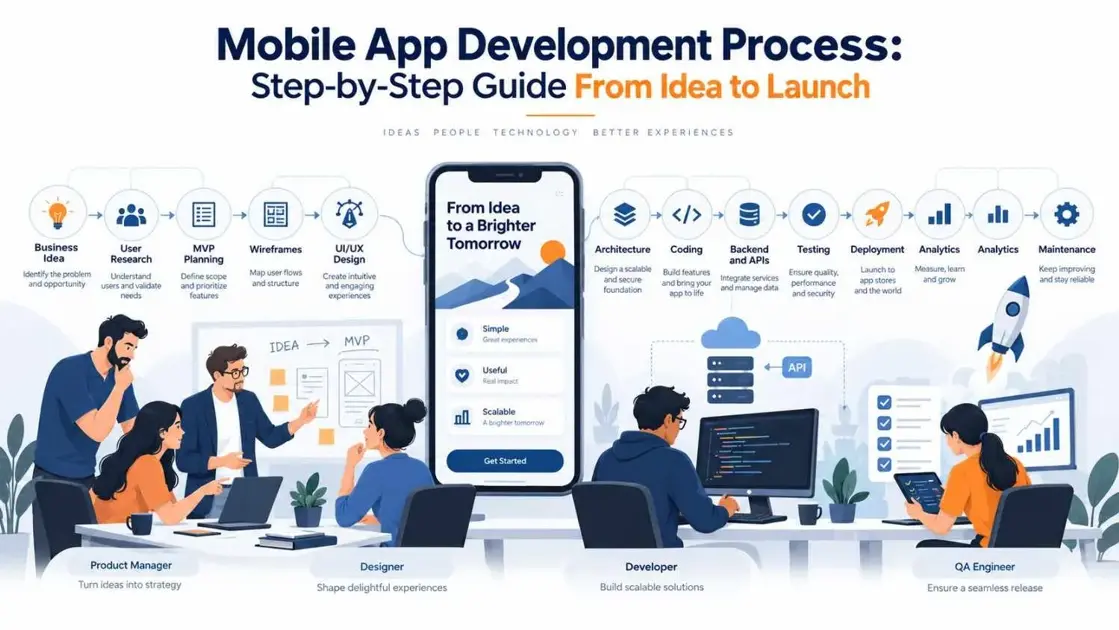
IMAGE 1 — Mobile App Development Process
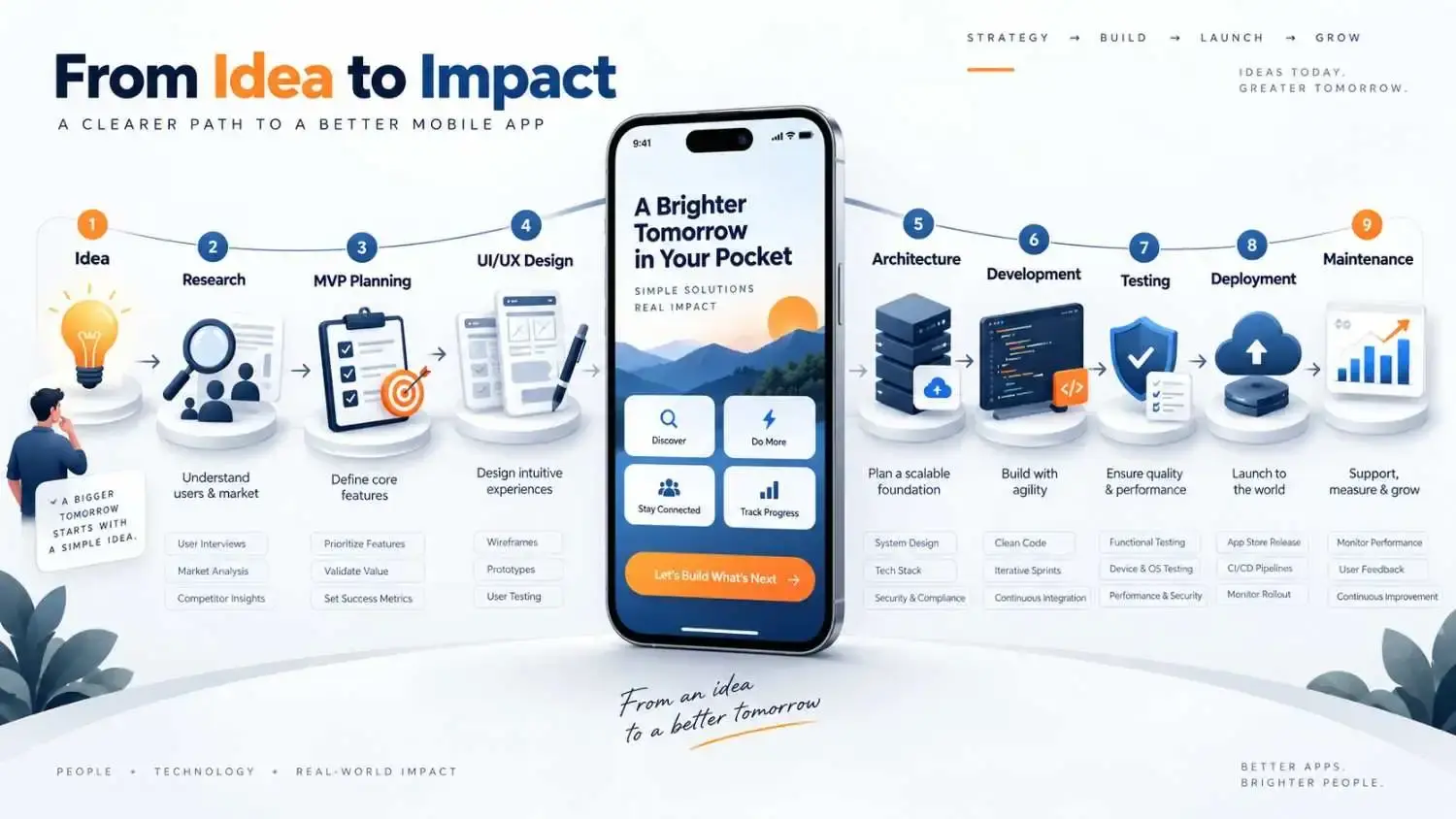
What Is the Mobile App Development Process?
The mobile app development process is the structured journey used to turn a business idea into a working mobile application. A typical process includes:
- Discovery and business analysis
- Market and user research
- Feature and MVP planning
- UI/UX design
- Technical architecture
- Mobile and backend development
- Testing and quality assurance
- Deployment
- Post-launch maintenance and optimization
These mobile app development stages are connected. A decision made during discovery can affect design. Design decisions affect development. Architecture choices can influence performance, security, scalability, cost, and even how easily new features can be added later. This is why jumping directly into development is usually a mistake.
Step 1: Start With the Business Problem
A good app development process does not begin with:
We need an app with 25 features.
It begins with:
What problem should this app solve?
Imagine a healthcare business planning an appointment app. The real objective may not simply be “build a booking app.” The business may want to:
- Reduce calls handled by reception staff
- Allow patients to book appointments 24/7
- Send automated reminders
- Reduce missed appointments
- Provide doctors with better scheduling visibility
That changes how the product should be designed. Before development starts, teams should define:
- Target audience
- Business objective
- User problem
- Expected outcome
- Project constraints
- Success metrics
Key deliverable: A clear product vision and initial requirements document. Common mistake: Starting with features instead of the problem those features need to solve.
Step 2: Research the Market and Users
An app can technically work perfectly and still fail commercially. That happens when businesses build something customers do not actually need. The research stage of the mobile application development process helps validate assumptions before significant development money is spent. Teams normally investigate:
- Target users
- Existing customer behavior
- Competitor apps
- Market expectations
- Common user frustrations
- Platform preferences
- Gaps in existing solutions
Competitor research is not about copying another application. The goal is to understand what users already expect and where your product can provide a better experience. For example, if almost every competing ecommerce app requires six steps to complete checkout, reducing that journey to three meaningful steps could become an important product advantage. Key deliverable: User personas, competitor insights, and validated product assumptions.
Step 3: Define Features and Build the MVP Scope
This is where app ideas often become unnecessarily expensive. Once brainstorming begins, almost every feature sounds important. Push notifications. AI recommendations. Advanced dashboards.
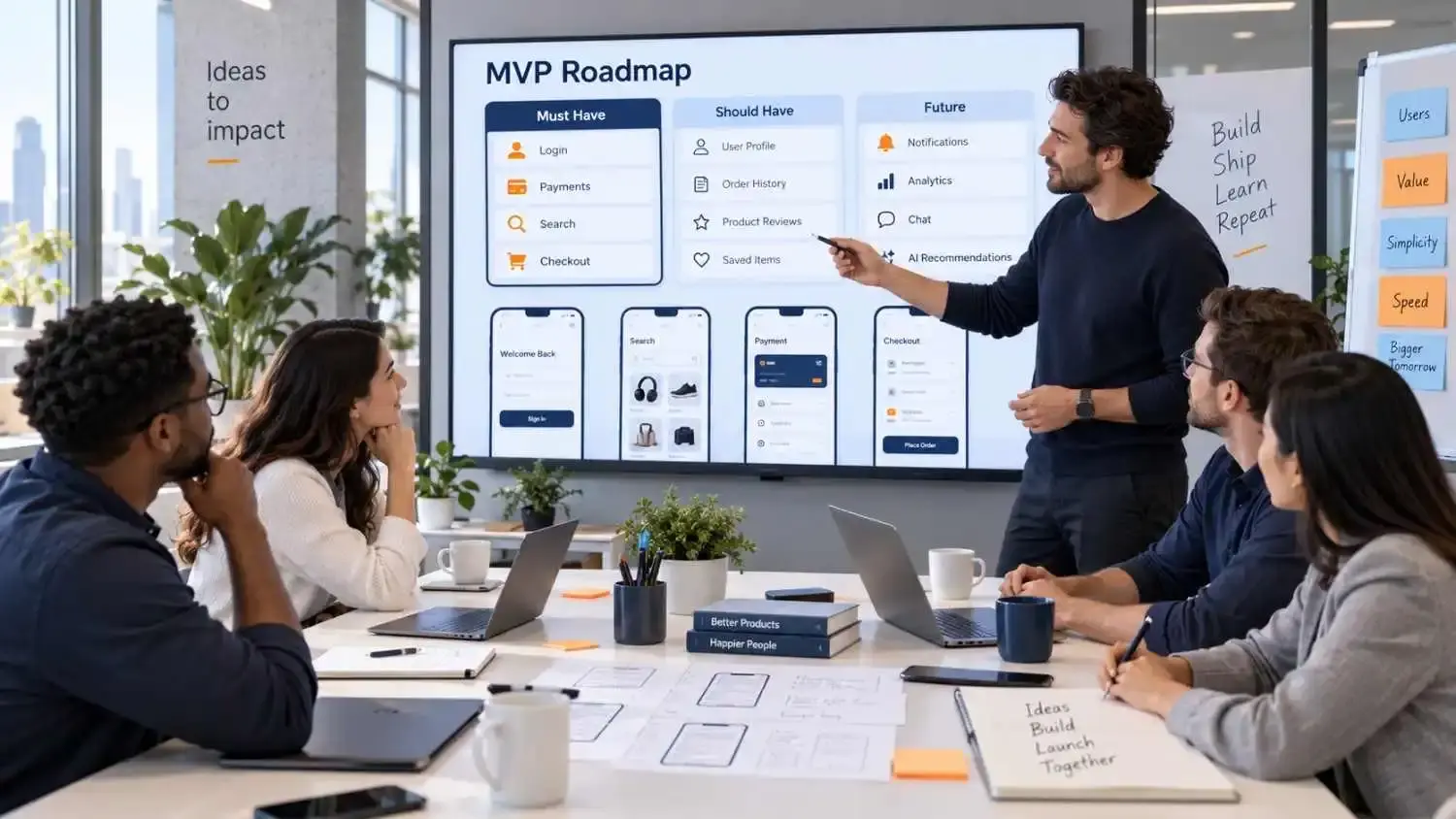
Must Have
Features required for the core product to work.
Should Have
Useful features that improve the experience but are not essential for the first release.
Future
Features that can be introduced after real users begin using the application. An MVP, or Minimum Viable Product, should deliver the smallest complete experience that allows the business to test its most important assumptions. For an ecommerce application, the MVP might include:
- Product discovery
- Product pages
- Search
- Cart
- Checkout
- Payments
- Order tracking
Features such as personalized AI recommendations, advanced analytics, loyalty programs, or community functionality may come later. The important question is: Does this feature need to exist for the first version to prove the product works? If the answer is no, it probably does not belong in the MVP. Key deliverable: Prioritized feature list and MVP roadmap.
IMAGE 2 — MVP Feature Prioritization
Step 4: Choose the Right Development Approach
One of the most important mobile app development decisions is determining how the application will be built. Businesses generally evaluate native and cross-platform development.
Native Development
Native applications are developed specifically for individual platforms. Android applications commonly use technologies such as Kotlin, while iOS applications commonly use Swift. Native development can provide:
- Deep platform integration
- Strong device access
- Platform-specific user experiences
- Greater control over operating-system functionality
However, building separate Android and iOS applications can require more development and maintenance effort.
Cross-Platform Development
Frameworks such as Flutter and React Native allow teams to share significant portions of one codebase across Android and iOS. This can reduce duplicate development work and may be useful when businesses need both platforms without maintaining two completely independent applications. The right choice depends on:
- Product complexity
- Device features
- Performance expectations
- Budget
- Development timeline
- Existing team expertise
- Long-term maintenance
Technology should follow the business requirement—not whichever framework happens to be trending.
For the cross-platform decision, read Flutter vs React Native in 2026.
Step 5: Create User Flows and Wireframes
Before designers start choosing colors, fonts, illustrations, or animations, the team needs to understand how users will move through the product. This is where user flows and wireframes are created. For an ecommerce app, a user journey might look like: Open App → Sign In → Search Product → Product Page → Add to Cart → Checkout → Payment → Confirmation Wireframes then convert that journey into basic screen structures. At this stage, visual polish is less important than usability. Teams should ask:
- Can users find important actions quickly?
- Are unnecessary screens being added?
- Is navigation clear?
- Is the next action obvious?
- What happens when something goes wrong?
- Does every screen serve a purpose?
Changing a wireframe can take minutes. Changing a completed application flow may require design changes, development changes, backend changes, testing, and another release cycle. That is why important usability decisions should happen early. Key deliverable: Approved user flows and wireframes.
Step 6: Design the UI and UX
Once the structure is approved, designers turn wireframes into the interface users will actually experience. UI/UX design covers areas such as:
- Screen layouts
- Typography
- Colors
- Buttons
- Forms
- Navigation
- Interactions
- Accessibility
- Responsive behavior
- Loading states
- Empty states
- Error messages
Good mobile design should make important actions feel obvious. Users should not have to stop and think:
What am I supposed to press next?
Interactive prototypes can also be useful at this stage. Stakeholders can experience important user journeys before development begins, giving the team another opportunity to identify confusing workflows while changes are still relatively inexpensive.
Step 7: Plan the Technical Architecture
The screens users see are only one part of a mobile application. Behind those screens may be:
- Databases
- APIs
- Authentication systems
- Cloud infrastructure
- Payment services
- Analytics platforms
- Notification services
- Search systems
- File storage
- Third-party integrations
- Internal business software
Technical architecture determines how these systems communicate. A simplified mobile architecture may look like: Mobile App ↓ API Layer ↓ Backend ↓ Database The backend may then connect with:
- Authentication
- Payment gateways
- Cloud infrastructure
- Push notifications
- Analytics
- CRM
- ERP
- Inventory systems
- AI services
- Third-party platforms
This stage becomes especially important when a business expects the product to grow. An application designed for a few hundred users may require very different infrastructure from a platform expected to support hundreds of thousands of users. Good architecture does not mean making everything unnecessarily complex. It means creating a structure that supports current needs without making future changes unnecessarily difficult. For applications connected to wider business systems, IntuivoTech's bespoke software development capabilities can also support custom backend platforms, integrations, APIs, and scalable software architecture.
Explore IntuivoTech Bespoke Software Development Services for these broader system requirements.
IMAGE 3 — Mobile App Technical Architecture

Step 8: Develop the Mobile App and Backend
Now development begins. But professional teams usually do not disappear for several months and return with a finished product. Development is often divided into smaller iterations or sprints. A sprint may focus on:
- User authentication
- Product catalogue
- Booking workflow
- Checkout
- Payment integration
- Dashboard
- Notifications
- Search
- Profiles
The mobile interface, backend, APIs, and integrations should be developed together so information can move reliably across the complete system. Regular product reviews during development are important. They allow stakeholders to:
- See progress
- Catch misunderstandings
- Review working features
- Validate assumptions
- Prioritize upcoming work
- Identify problems before they become deeply embedded
Common mistake: Treating development as a black box and reviewing the product only when it is nearly finished.
Step 9: Test Before Users Find the Problems
Testing should not be treated as the final checkbox before launch. Quality assurance should happen throughout the mobile app development process. Different types of testing answer different questions.
Functional Testing
Does every feature work correctly?
UI Testing
Do screens display and behave properly?
Integration Testing
Are APIs, payments, databases, and external services communicating correctly?
Performance Testing
Does the application remain responsive during real usage?
Security Testing
Are authentication, permissions, APIs, and sensitive information properly protected?
Compatibility Testing
Does the application work across supported:
- Android versions
- iOS versions
- Screen sizes
- Device models
- Network conditions
Testing should also include failure scenarios. What happens if payment fails? What happens if the internet disappears during checkout? What happens when GPS permission is denied? What happens if an API takes too long? What happens if an external service becomes unavailable? A production-ready application should not work only when everything is perfect. It should handle imperfect conditions gracefully.
IMAGE 4 — Mobile App Testing and QA

Step 10: Deploy the Application
After testing and stakeholder approval, the app moves into deployment. For consumer applications, this usually means preparing releases for:
- Apple App Store
- Google Play
But deployment includes much more than uploading an application file. Teams may need to prepare:
- App name
- App description
- Screenshots
- Icons
- Privacy information
- Permissions
- Release configurations
- Signing certificates
- Production backend
- Production database
- Analytics
- Crash monitoring
The backend and supporting cloud infrastructure must also be ready for real users. Deployment should therefore be treated as a development stage rather than something added at the last minute.
Step 11: Monitor, Maintain and Improve
Launch is not the end of the mobile app development cycle. It is the point where assumptions finally meet real users. After launch, teams should monitor:
- Crashes
- Application performance
- API failures
- User behavior
- Retention
- Conversion rates
- Feature adoption
- App reviews
- Customer complaints
- Support requests
That information helps determine what should happen next. Maintenance can include:
- Bug fixes
- Security updates
- New operating-system compatibility
- Performance improvements
- Dependency updates
- Infrastructure improvements
- New features
The strongest product roadmap after launch is usually driven by actual user behavior rather than assumptions made before launch. A successful mobile application continuously evolves.
How Long Does the Mobile App Development Process Take?
There is no universal mobile app development timeline. A focused MVP may move much faster than a marketplace, fintech platform, healthcare application, logistics system, or enterprise product. Timeline depends on:
- Number of features
- UI/UX complexity
- Android and iOS requirements
- Backend complexity
- APIs
- Third-party integrations
- Security requirements
- Team size
- Stakeholder approvals
- Testing requirements
A relatively simple application may take a few months. Larger products can take considerably longer. Trying to force every project into an arbitrary deadline often creates technical debt rather than genuine speed. A better approach is to define the MVP clearly and reduce unnecessary scope before attempting to reduce development time.
Common Mistakes That Delay Mobile App Development
Many development delays are actually created before coding begins. Common problems include:
Unclear Requirements
Developers cannot accurately build something that has never been properly defined.
Too Many Version-One Features
Every additional feature creates more design, development, testing, and maintenance work.
Constant Scope Changes
Changing priorities during development can affect architecture, timelines, and budgets.
Late Stakeholder Feedback
Receiving major feedback after development has already been completed makes changes more expensive.
Ignoring Backend Requirements
The mobile interface is only one part of the product.
Testing Too Late
Finding major issues just before launch creates unnecessary pressure.
Choosing Technology Too Early
Do not decide the framework before understanding the product. One useful rule is:
Make expensive decisions early—while they are still cheap to change.
What Should You Expect From a Mobile App Development Company?
A reliable mobile app development company should do more than accept a feature list and start coding. The team should help you:
- Question assumptions
- Prioritize requirements
- Choose appropriate technology
- Design scalable architecture
- Plan backend systems
- Build integrations
- Test important workflows
- Prepare deployment
- Plan post-launch support
Look for a partner that provides:
- Clear discovery
- Transparent project planning
- Regular communication
- UI/UX capability
- Mobile development expertise
- Backend expertise
- Structured QA
- Security awareness
- Deployment support
- Post-launch maintenance
Choosing the right development team can influence the product just as much as choosing the right technology.
Use the How to Choose a Mobile App Development Company guide before shortlisting a partner.
Final Thoughts
The mobile app development process is not simply: Idea → Code → App Store A better representation is: Problem → Research → Scope → Design → Architecture → Development → Testing → Launch → Learn → Improve Each stage reduces a different type of risk. Research reduces market risk. Wireframes reduce usability risk. Architecture reduces technical risk. Testing reduces product risk. Post-launch analytics reduce future decision-making risk. Businesses that understand this process are in a much stronger position to control budgets, make better product decisions, and build applications that can evolve as users and business requirements change. The goal is not simply to launch an app. The goal is to build a product that users can rely on and the business can continue improving.
For ecommerce-specific requirements such as catalog, checkout, payments, and order tracking, see the Ecommerce Mobile App Development Guide.
Ready to Turn Your App Idea Into a Scalable Product?
IntuivoTech works with startups, founders, and growing businesses to plan, design, and build digital products around real business requirements—not generic templates. From product strategy and UI/UX to architecture, mobile development, backend systems, integrations, testing, deployment, and ongoing improvements, the goal is to build software that is ready for both launch and what comes next. Explore IntuivoTech Mobile App Development Services
Frequently Asked Questions
What are the main stages of mobile app development?
The main stages usually include discovery, research, MVP planning, UI/UX design, technical architecture, development, testing, deployment, and ongoing maintenance.
What is the first step in mobile app development?
The first step should be defining the business problem, target user, and desired outcome. Technology and features should be selected after the product objective is clear.
Should I build an MVP first?
For many startups and new digital products, an MVP is useful because it allows the business to validate the core product idea with real users before investing in a larger feature set.
What is the difference between native and cross-platform development?
Native apps are developed specifically for individual platforms such as Android or iOS. Cross-platform frameworks such as Flutter and React Native can share significant portions of code across multiple platforms. The correct approach depends on performance requirements, product features, budget, existing team skills, and long-term plans.
Does mobile app development end after launch?
No. Production applications require monitoring, bug fixes, security updates, operating-system compatibility improvements, performance optimization, and ongoing feature development.
How long does mobile app development take?
There is no fixed timeline. A focused MVP may take a few months, while applications with complex backend systems, integrations, multiple user roles, advanced security requirements, or large feature sets can take considerably longer.
How much does mobile app development cost?
Cost depends on factors such as number of features, platforms, UI/UX complexity, backend development, integrations, APIs, security, testing, infrastructure, and post-launch maintenance. A useful estimate should therefore be based on actual project requirements rather than a generic cost-per-screen calculation.